Teams vs Channels Decision Trees
Do we need a new Team?
Do we need a new Channel?
The M365 Rookie Question That Never Gets Easier
"Should this be a new Team or just add a Channel?"
If you're new to Microsoft Teams adoption, this question probably keeps coming up. You want to make the right choice, but every time you ask someone experienced, you get the same answer: "It depends."
That's frustrating when you're trying to learn.
You think: Depends on what, exactly? What am I supposed to be considering here?
The problem isn't that "it depends" is wrong—it's that nobody explains what the dependency parameters actually are.
Here's What "It Depends" Actually means
When M365 veterans say "it depends," they're unconsciously weighing these four key factors. But if you don't have experience orchestrating Teams spaces, you don't know what to look for.
The dependency parameters:
Team Size - How many people will be involved?
Duration - Is this temporary work or ongoing?
Scope - Does this cross department boundaries?
Resources - Does this have dedicated budget and leadership?
These aren't arbitrary rules—they're the factors that determine how Teams and Channels actually function in practice.
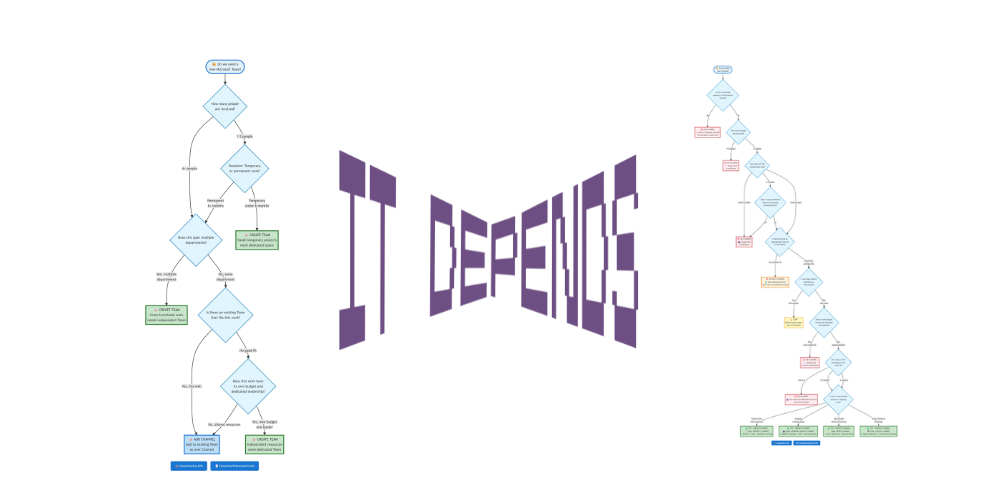
And to make it easier for people to decide, let’s give them two decision trees:
Do we need a new Team?
new Microsoft Team?]) --> Q1{How many people
are involved?} Q1 -->|1-5 people| Q2{Duration: Temporary
or permanent work?} Q1 -->|6+ people| Q3{Does this span multiple
departments?} Q2 -->|Temporary
under 6 months| A1[📝 CREATE TEAM
Small temporary projects
need dedicated space] Q2 -->|Permanent
6+ months| Q3 Q3 -->|Yes, multiple
departments| A2[📝 CREATE TEAM
Cross-functional work
needs independent Team] Q3 -->|No, same
department| Q4{Is there an existing Team
that fits this work?} Q4 -->|Yes, fits well| A3[📝 ADD CHANNEL
Add to existing Team
as new Channel] Q4 -->|No good fit| Q5{Does this work have
its own budget and
dedicated leadership?} Q5 -->|Yes, own budget
and leader| A4[📝 CREATE TEAM
Independent resources
need dedicated Team] Q5 -->|No, shared resources| A3 style Start fill:#e3f2fd,stroke:#1976d2,stroke-width:4px style A1 fill:#c8e6c9,stroke:#2e7d32,stroke-width:4px style A2 fill:#c8e6c9,stroke:#2e7d32,stroke-width:4px style A4 fill:#c8e6c9,stroke:#2e7d32,stroke-width:4px style A3 fill:#bbdefb,stroke:#1976d2,stroke-width:4px style Q1 fill:#e1f5fe,stroke:#0277bd,stroke-width:2px style Q2 fill:#e1f5fe,stroke:#0277bd,stroke-width:2px style Q3 fill:#e1f5fe,stroke:#0277bd,stroke-width:2px style Q4 fill:#e1f5fe,stroke:#0277bd,stroke-width:2px style Q5 fill:#e1f5fe,stroke:#0277bd,stroke-width:2px
Do we need a new Channel?
new Channel?]) --> Q1{Is this a one-time
question or information
request?} Q1 -->|Yes| A1[❌ NO CHANNEL
📝 Post in General Channel
of the Team or use Chat] Q1 -->|No| Q2{How many people
are involved?} Q2 -->|1-2 people| A2[❌ NO CHANNEL
💬 Direct Chat
is sufficient] Q2 -->|3+ people| Q3{How long will the
collaboration last?} Q3 -->|Under 2 weeks| A3[❌ NO CHANNEL
👥 Group Chat
is sufficient] Q3 -->|2-4 weeks| Q4{Does it need dedicated
files or structured
documentation?} Q3 -->|Over 4 weeks| Q5{Is there already an
appropriate Channel
in this Team?} Q4 -->|No| A3 Q4 -->|Yes| Q5 Q5 -->|Yes, perfect fit| A4[❌ NO NEW CHANNEL
♻️ Use existing Channel
Start new conversation thread] Q5 -->|No or only
partially fits| Q6{Is the topic clearly
defined and
well-scoped?} Q6 -->|No,
still unclear| A5[⚠️ STOP
Define scope clearly
then re-evaluate] Q6 -->|Yes,
very clear| Q7{Does it need regular
structured discussion
and updates?} Q7 -->|No,
only occasional| A6[❌ NO CHANNEL
💬 Group Chat
in Team is sufficient] Q7 -->|Yes,
regular updates| Q8{How many active
participants will
there be?} Q8 -->|Under 3| A7[❌ NO CHANNEL
👥 Too small for dedicated Channel
Use Chat instead] Q8 -->|3-5 people| Q9{Is this a time-limited
project or ongoing
work?} Q8 -->|6+ people| Q9 Q9 -->|Project with
clear end date| A8[✅ YES - CREATE CHANNEL
📋 Type: PROJECT CHANNEL
+ Planner + Files + Deadline tracking] Q9 -->|Ongoing
working group| A9[✅ YES - CREATE CHANNEL
👥 Type: WORKING GROUP CHANNEL
+ Regular meetings + Wiki + Documentation] Q9 -->|Topic-based
without fixed end| A10[✅ YES - CREATE CHANNEL
💡 Type: TOPIC CHANNEL
+ Clear objectives + Review dates] Q9 -->|Social/informal
exchange| A11[✅ YES - CREATE CHANNEL
☕ Type: SOCIAL CHANNEL
+ Light moderation + Community building] style Start fill:#e3f2fd,stroke:#1976d2,stroke-width:4px style A1 fill:#ffebee,stroke:#c62828,stroke-width:3px style A2 fill:#ffebee,stroke:#c62828,stroke-width:3px style A3 fill:#ffebee,stroke:#c62828,stroke-width:3px style A4 fill:#fff3e0,stroke:#f57c00,stroke-width:3px style A5 fill:#fff9c4,stroke:#f9a825,stroke-width:3px style A6 fill:#ffebee,stroke:#c62828,stroke-width:3px style A7 fill:#ffebee,stroke:#c62828,stroke-width:3px style A8 fill:#c8e6c9,stroke:#2e7d32,stroke-width:4px style A9 fill:#c8e6c9,stroke:#2e7d32,stroke-width:4px style A10 fill:#c8e6c9,stroke:#2e7d32,stroke-width:4px style A11 fill:#c8e6c9,stroke:#2e7d32,stroke-width:4px style Q1 fill:#e1f5fe,stroke:#0277bd,stroke-width:2px style Q2 fill:#e1f5fe,stroke:#0277bd,stroke-width:2px style Q3 fill:#e1f5fe,stroke:#0277bd,stroke-width:2px style Q4 fill:#e1f5fe,stroke:#0277bd,stroke-width:2px style Q5 fill:#e1f5fe,stroke:#0277bd,stroke-width:2px style Q6 fill:#e1f5fe,stroke:#0277bd,stroke-width:2px style Q7 fill:#e1f5fe,stroke:#0277bd,stroke-width:2px style Q8 fill:#e1f5fe,stroke:#0277bd,stroke-width:2px style Q9 fill:#e1f5fe,stroke:#0277bd,stroke-width:2px
Give Feedback - What Would You Improve Here?
These decision trees work for many organizations, but every company has unique collaboration patterns. If you've used these frameworks, I'd love to hear what worked, what didn't, and what parameters would make them more useful for your specific context.
What would you adjust for your organization? What questions are missing? What scenarios don't fit?
Contact me on LinkedIn - Always interested in making these tools more practical for real-world M365 adoption challenges.
